


Bloomberg: Finance Market News
4.06.16K Reviews
App Specs
- Version
- Varies with Device
- Updated On
- License
- Free
- Downloads
- 10,000,000+
- Developer
- Bloomberg LP CM
- Categories
- News & Magazines
- Platform
- Android
Screenshots

 Analysis by AppCompare
I judge a finance app by how well it helps me make sense of a busy news day, not by how many numbers it can squeeze onto a screen. Bloomberg: Finance Market News is aimed at readers who want business and market coverage together, and that combination is its clearest appeal. I’d treat it as a place to follow stories and check the subjects I care about, rather than assume that an app full of market information can make investment decisions for me.
What the free download does—and what paid access means
The app is free to download, which makes it easy to try it as a news reader before deciding whether it belongs in your daily routine. Bloomberg LP CM develops it, and its focus spans finance, business, economics, markets, and investing. There are in-app purchases listed from $29.99 to $399.99 per item, so free installation should not be confused with every possible form of access being free. I’d check the purchase details in the app before paying, especially if I only want occasional news rather than regular use.
That distinction matters because the app’s value depends on what you need from it. If I want a convenient way to keep up with major business stories, the free download gives me a low-commitment starting point. If I’m considering a paid option, I’d first work out how often I read Bloomberg coverage and whether the specific access offered suits that habit. The listed purchase range is broad, so it’s worth making that decision deliberately rather than treating a purchase as an automatic upgrade.
Where its value shows up in a normal day
The strongest case for Bloomberg is having financial news and market context close at hand. On a commute, I might scan headlines about a company or economic development; later, I can return to the subject when I have time to read more carefully. That kind of two-stage reading is more useful to me than opening a stream of headlines, glancing at numbers, and forgetting what moved the market in the first place.
It can also serve as a focused companion to a portfolio tracker. A tracker can tell me that a holding moved; a business-news app can help me look for the broader story behind the move. I would use the two for different jobs, though. News can give context, but it is not a substitute for checking the details of a trade, comparing investment options, or understanding the risks involved.
First Impressions and Interface
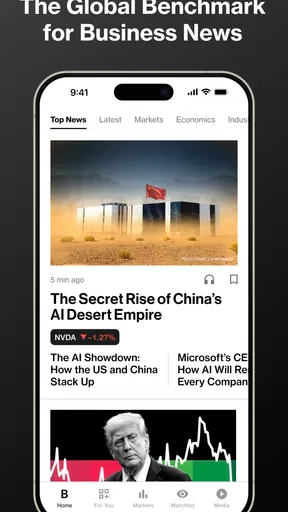
When I first opened the Bloomberg: Finance Market News app, I was immediately impressed by its clean and professional interface. Everything is laid out in a way that makes sense, even if you're not a financial guru. The app has a sleek design, with a dark theme that’s easy on the eyes, especially when you’re doom-scrolling late at night.
The navigation is super intuitive. You’ve got your menu at the bottom, where you can switch between Markets, Watchlist, News, and more. I appreciate that it doesn’t feel cluttered, which is often a problem with apps that try to pack in too much information.
Worth Reading Before You Choose

Baby Panda World Brings Quick Play to Modern Phones, but Its Game Library Feels Busy

ESPN’s Live Game View Makes Following Close Games Easier

QuizzLand Review: A Good Fit for Short Trivia Breaks, Not Every Player

Basketball Stars: Multiplayer Is Fast, but Can It Recover When Matches Go Wrong?

WEBTOON Turns Phone Updates Into a Better Reading Routine

Link to Windows Runs on Shared Habits, Not Social Feeds
Features That Stand Out
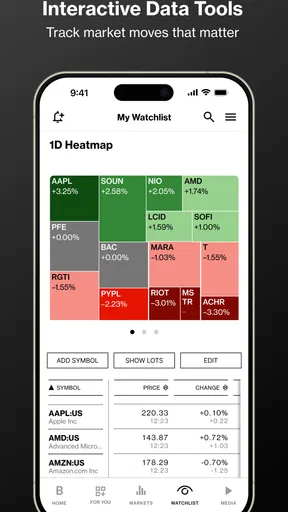
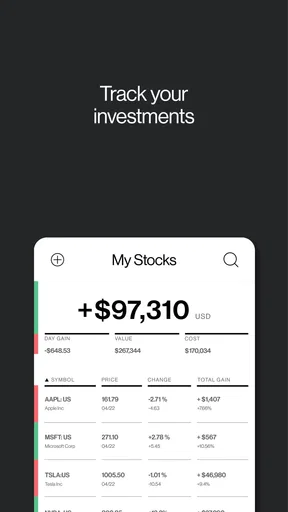
Now, let’s talk features. One of the things I love is the personalized Watchlist. You can easily add stocks, indices, or commodities that you want to keep an eye on. The app updates in real-time, so you’re always in the loop with the latest changes. This is a huge plus if you’re actively trading or just want to keep track of your investments.
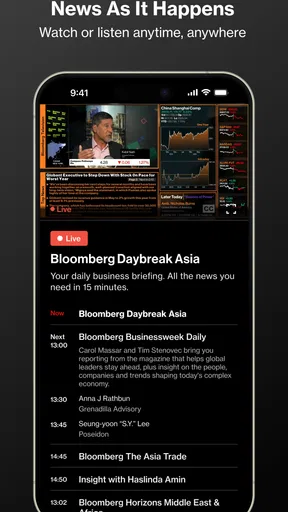
The news section is another highlight. Bloomberg's journalists are top-notch, and you get access to insightful articles, analyses, and even video content. It’s like having a financial newspaper in your pocket. And let’s not forget the Bloomberg TV live stream, which you can watch directly from the app. Perfect for when you want a more in-depth look at the market trends.
User Experience
Using the app feels smooth, and I haven’t experienced any crashes or bugs so far. The loading times are quick, which is crucial when you need to check something in a hurry. Plus, the app’s search functionality is robust, making it easy to find specific stocks, news articles, or financial terms.
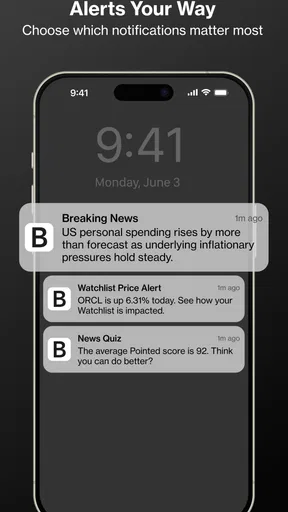
I also appreciate the customizable notifications. You can set alerts for market news, stock price changes, or economic events. This way, you’re always informed without being overwhelmed by information you don’t need.
Learning Curve
If you’re new to finance apps, there might be a slight learning curve, but nothing too daunting. The app does a decent job of guiding you through its features when you first set it up. Plus, there are plenty of resources online if you ever get stuck.
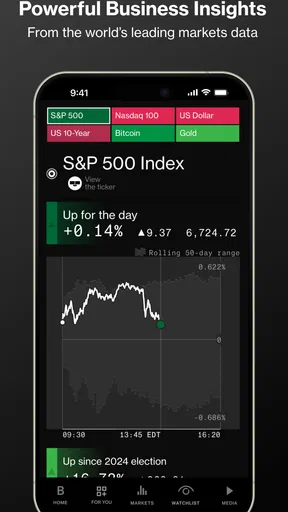
For seasoned investors, the app offers advanced tools like charting and analytics, which can be incredibly useful for making informed decisions. It’s like having a financial advisor on your phone, minus the hefty fees.
Choosing the right alerts and watchlists
A useful way to keep the app from becoming another source of noise is to start with a short watchlist. I’d add only the companies or market indicators I genuinely follow, then use alerts selectively for changes I would act on by checking further. A notification is a prompt to investigate, not a recommendation to buy or sell. That small distinction helps keep quick updates in their proper place.
For a person following several parts of the economy, separating a daily scan from deeper reading can also make the app easier to use. I’d check the watchlist briefly, then open a story only when its subject matters to my work, savings, or interests. If every alert feels urgent, I’d reduce them; constant interruptions make it harder to tell an important development from routine market movement.
How it compares with other ways to follow finance
Compared with a general news app, Bloomberg is a more natural fit when business and markets are the main reason I’m opening the phone. A broad news feed may offer a wider mix of subjects, but that can mean more filtering before I reach the financial coverage I want. By contrast, a dedicated market-data app may be better for someone who mostly needs to monitor prices or review a portfolio. I see Bloomberg’s role as connecting market interest with reporting, rather than replacing every financial tool.
There is a practical trade-off in choosing a specialist source: it can keep a finance-focused reader engaged, but it may not be the best one-app solution for someone who wants local headlines, general-interest reporting, and entertainment news in the same feed. I’d pair it with a broader news source if those subjects matter to me. And if I only need a quote for a quick check, a simpler market utility may be faster than opening a full news experience.
Who is likely to get the most from it?
I’d recommend trying it if you follow companies, economic news, or markets often enough to benefit from returning to the same subjects. It can suit an investor who wants reporting alongside a watchlist, a student building familiarity with business coverage, or a curious reader who wants a more finance-centered news habit. It is also a reasonable option for someone who checks headlines in short sessions rather than sitting down for a long read every time.
I’d be less enthusiastic if you rarely read financial news, dislike specialist terminology, or want a simple tool that only tracks a few prices. In those cases, the volume and subject matter may feel like more than you need. A general news app is a better fit for mixed interests, while a dedicated portfolio tool is more appropriate when monitoring holdings is the primary task. Neither alternative makes Bloomberg pointless; it just means the best choice depends on what you open an app to do.
One realistic way I’d use it
Imagine checking the markets over breakfast before a workday. I’d scan the stories and my watchlist, note a company or economic subject that might affect something I follow, and save my deeper reading for a break. If a notification arrives while I’m busy, I can decide whether it deserves attention instead of reacting immediately. At the end of the day, I might revisit the reporting to understand the context, while checking any actual investment decision against sources and information beyond a headline.
This routine uses the app as a daily briefing aid, not as a trading signal. It also answers a common practical question: do I need to be an active trader to benefit? No. Someone who simply wants to understand business news can use it too, provided they enjoy reading about markets and are comfortable treating price moves as only one part of a larger story.
Cost, age suitability, and practical expectations
The app is rated Everyone 10+, and it has been available since March 17, 2014. Its average rating is 3.9 from around 80,000 ratings, while it has more than 10 million installs. I take that broad adoption as a sign that it has reached many readers, not as proof that it will match every person’s preferences. Ratings can reflect different expectations about access, news coverage, or how much financial detail someone wants.
For compatibility, the stated minimum operating system is version 7.0. If I’m using an older device, I’d check that requirement before planning to install it. The purchase range also deserves attention: I’d review what an in-app option includes and how it fits my reading frequency before committing. A free download is a sensible first step, but it does not by itself answer whether a paid choice is worthwhile for a particular reader.
Learning Curve
If you’re new to finance apps, there might be a slight learning curve, but nothing too daunting. The app does a decent job of guiding you through its features when you first set it up. Plus, there are plenty of resources online if you ever get stuck.
For seasoned investors, the app offers advanced tools like charting and analytics, which can be incredibly useful for making informed decisions. It’s like having a financial advisor on your phone, minus the hefty fees.
Final Thoughts
All in all, Bloomberg: Finance Market News is a powerhouse for anyone interested in staying up-to-date with the financial world. Whether you’re a casual observer or a hardcore trader, the app offers valuable insights and tools that cater to all levels of expertise.
So, if you’re looking for a reliable, well-designed app to keep you informed about the markets, give Bloomberg a try. It might just be the financial companion you never knew you needed. Happy trading!
My buy-or-skip verdict
I’d start with the free download if financial reporting is already part of my week, then decide whether any in-app purchase makes sense only after I understand what it provides and how often I use it. For an occasional reader, paying may be hard to justify; for someone who regularly follows business and markets, the convenience of keeping reporting and market interests together may be more valuable. I would not pay simply because a price option appears in the app.
My recommendation is conditional but straightforward: give it a try if you want a finance-first news experience and will use the watchlist and reporting with purpose. Skip it if you mainly need a basic quote screen, a broad all-purpose news feed, or a tool that tells you what investment to make. Bloomberg can help me stay informed; the judgment about what to do with that information remains mine.
Pros
- Comprehensive market data access.
- Real-time financial news updates.
- Customizable watchlists and alerts.
- User-friendly interface design.
- Offline reading capabilities.
Cons
- Requires a subscription for full access.
- Heavy on data
- may use more battery.
- Limited features in free version.
- Occasional app crashes reported.
- No dark mode available.
FAQs for Bloomberg: Finance Market News
What features does the Bloomberg: Finance Market News app offer?
The Bloomberg app provides users with up-to-the-minute market data, news updates, and financial insights. It features customizable watchlists, live TV, podcasts, and a personalized news feed. Users can access detailed analyses and reports on stocks, bonds, commodities, and more, making it a comprehensive tool for finance enthusiasts and professionals.
Is the Bloomberg app free to use, or are there any subscription fees?
The Bloomberg app is free to download and offers a range of basic features without charge. However, for access to premium content and advanced features, users may need to subscribe to Bloomberg's premium services. Subscription fees can vary, so it's advisable to check the app or Bloomberg's website for the latest pricing details.
Can I access global financial markets through the Bloomberg app?
Yes, the Bloomberg app provides access to global financial markets. Users can track international stocks, currencies, and market indices. The app offers real-time data and news from around the world, allowing users to stay informed about global financial trends and events, making it ideal for investors with international interests.
How user-friendly is the Bloomberg app for beginners?
While the Bloomberg app is packed with features for advanced users, it also caters to beginners with its intuitive interface. The app provides tutorials and guides for new users to help them navigate and utilize its features effectively. However, beginners may need some time to fully explore and understand all available functionalities.
Is the Bloomberg app available on both Android and iOS devices?
Yes, the Bloomberg app is available for download on both Android and iOS platforms. Users can find it on the Google Play Store and Apple App Store. The app is regularly updated to ensure compatibility with the latest operating systems and to enhance user experience across both platforms.


